I was curious if I could sync my iPhone with iSync. Yes it is possible. There is a trick to it. One must have the status of iSync shown in the status bar and initiate the sync by clicking the status icon and choosing Sync Now. It will sync everything except for music and other iTunes stuff. Interestingly it will not show syncing notification on the iPhone screen.
I came to realize that iSync is used for non iTunes related syncing when, while playing around with the settings if the utility I changed the Protect your Data on your Computer setting from default of 5 percent to any. After that every time I would Sync in iTunes and any info at all has been changed in the contacts, an alert window would pop up asking for a permission to update the contacts on my Mac. Before it would only pop up if the change was 5% or more.
Opps I am late. Apperently it has been already discovered: Link
Showing posts with label Mac OS X. Show all posts
Showing posts with label Mac OS X. Show all posts
Monday, July 23, 2007


Tuesday, November 01, 2005
Mac Os 10.4.3 fixes Canon Raw file compatibility.
Several photography related fixes were included in the Apple's release of the upgrade for its Mac Os Tiger version 10.4.3.
OS level support for many RAW file formats now bug free. I was particularly happy to see support for both CRW and CR2 Canon Raw file formats supported in Finder, iPhoto and the Preview application. Also DNG format now has a better support by Apple applications. I believe that these fixes and new RAW file formats support were added by Apple in order for the new application for the photographers - Aperture, to work correctly, as the Aperture relies on the OS and its image format handling capabilities.
OS level support for many RAW file formats now bug free. I was particularly happy to see support for both CRW and CR2 Canon Raw file formats supported in Finder, iPhoto and the Preview application. Also DNG format now has a better support by Apple applications. I believe that these fixes and new RAW file formats support were added by Apple in order for the new application for the photographers - Aperture, to work correctly, as the Aperture relies on the OS and its image format handling capabilities.
Monday, August 29, 2005
Tuesday, July 26, 2005
Encoding of the MP3 tags on Mac Os X
After I started to use Mac OS one problem was constantly annoying me.
iTunes would not properly interpret mp3 tag info of my Russian songs, that I had to copy from my old Windows XP machine.
Instead of the song name in Cyrillic i would see a pseudo-Unicode gibberish. I tried to reimport, tried to rewrite iTunes library file.
Nothing would work. Luckily, after a long search online I have found a reference to the Unicode Rewriter on one of the Mac Os Hints (link) forums.
This java program worked beautifully. Check it out.
iTunes would not properly interpret mp3 tag info of my Russian songs, that I had to copy from my old Windows XP machine.
Instead of the song name in Cyrillic i would see a pseudo-Unicode gibberish. I tried to reimport, tried to rewrite iTunes library file.
Nothing would work. Luckily, after a long search online I have found a reference to the Unicode Rewriter on one of the Mac Os Hints (link) forums.
This java program worked beautifully. Check it out.
Tuesday, July 12, 2005
Resolving a problem with Palm synchronization using iSync 2.1
Making iSync 2.1 work with PalmOs devices.
This tip applies only to the devices supported by iSync 2.1.
Yesterday I have tried to enable iSync with Palm Treo600. As usual, I have followed all of the procedures, read all of the official apple support articles, yet it would not work.
When I was trying to enable Palm devise from within iSync I would get a message reporting that I have not installed Palm HotSync nor have I used it. Reinstallation of Palm software did not help. So I decided to reinstall the iSync. Which in its turn messed up the whole OS and forced me to the MacOs Tiger Archive and Install and then to Erase and Install.
After all of this it still would not work. However it showed me that I am not of a peril and it is likely OS fault.
Anyway. Here what you should do.
Before enabling Palm Device Syncing in iSync you should, of course, install the latest version of the Palm desktop. Then you need to change permissions for the folder and its content at /Library/Application Support/Palm HotSync. You should ctrl+click the folder and choose Get Info. There make yourself an owner of a folder and allow yourself to read and write. Also opt in to apply the setting to the enclosed files and folders.
After this follow the iSync procedure as recommended by Apple, to enable the Palm Os syncing.
This tip applies only to the devices supported by iSync 2.1.
Yesterday I have tried to enable iSync with Palm Treo600. As usual, I have followed all of the procedures, read all of the official apple support articles, yet it would not work.
When I was trying to enable Palm devise from within iSync I would get a message reporting that I have not installed Palm HotSync nor have I used it. Reinstallation of Palm software did not help. So I decided to reinstall the iSync. Which in its turn messed up the whole OS and forced me to the MacOs Tiger Archive and Install and then to Erase and Install.
After all of this it still would not work. However it showed me that I am not of a peril and it is likely OS fault.
Anyway. Here what you should do.
Before enabling Palm Device Syncing in iSync you should, of course, install the latest version of the Palm desktop. Then you need to change permissions for the folder and its content at /Library/Application Support/Palm HotSync. You should ctrl+click the folder and choose Get Info. There make yourself an owner of a folder and allow yourself to read and write. Also opt in to apply the setting to the enclosed files and folders.
After this follow the iSync procedure as recommended by Apple, to enable the Palm Os syncing.
Wednesday, May 18, 2005
Dashboard trouble under Tiger 10.4.1
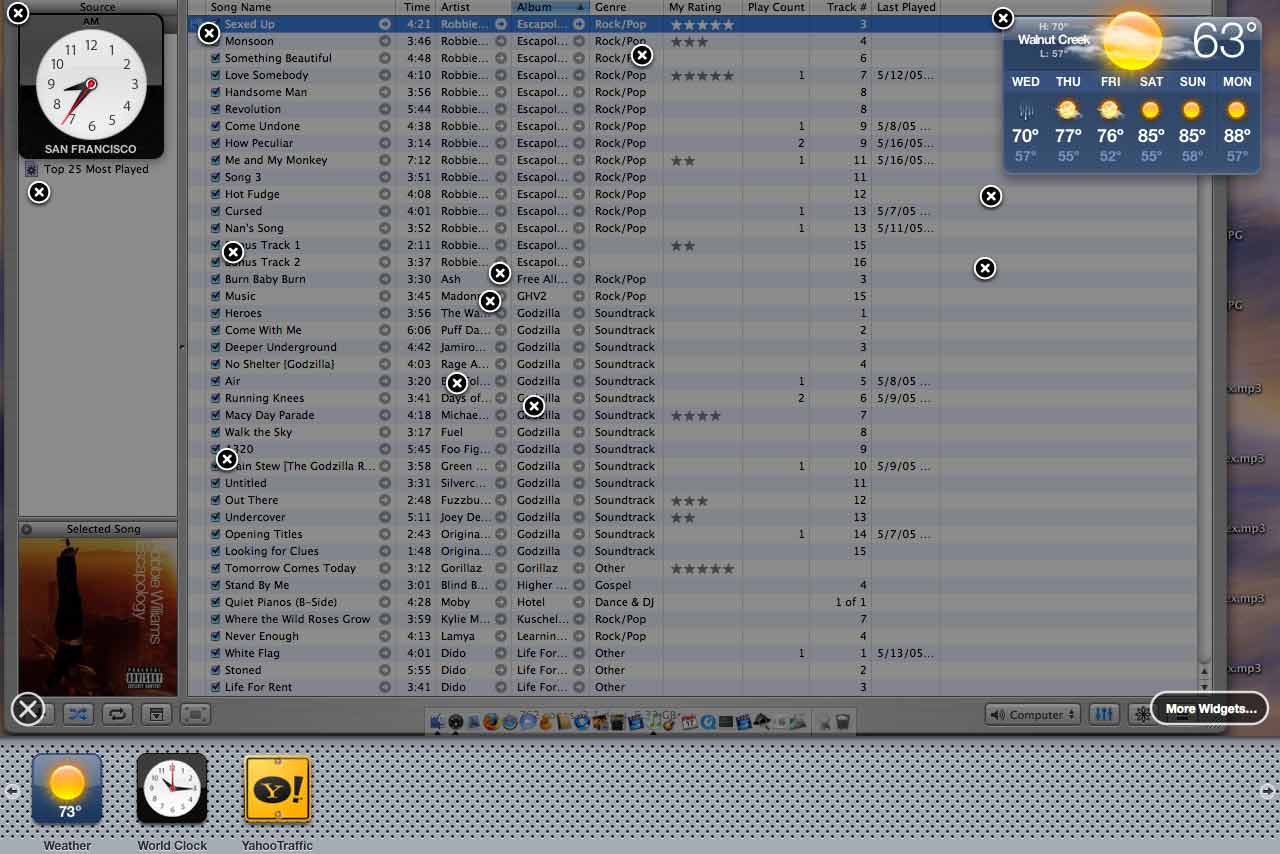
I am having a weird thing happenning to my dashboard under 10.4.1
Check out the image:

Check out the image:
Subscribe to:
Posts (Atom)

 Posts
Posts

