It is unfortunate that the iPhone does not provide with the ability to block or silence some of the calls, coming from some particular phone number.
If you are anything like me, you have a desire to completely silence calls from certain people, who a crazy but are still useful to know. Just not at 2 am. And turning off your iPhone is not an option, as you'd rather be able to stay in contact with your aunt Griselle at any time of day or night, as her cookies are delicious. Delicious! So what do you do?
Simply download this small file SilentRingtone. If it does not open automatically, drag it into an open iTunes window, and it should take care of it from then on. The new ring tone should appear in the ring tone list inside the iTunes.
Assign the ringtone to any contact you'd rather not bother you using the edit function inside the Contacts app on your iPhone. When that crazy Mary calls you nothing will happen (though the iPhone's screen will light up showing the contact's name and it will vibrate if you are in the silent mode or have the vibration enabled at all the times) but no sound will be made.
Problem solved.
Showing posts with label Apple. Show all posts
Showing posts with label Apple. Show all posts
Sunday, August 30, 2009


Thursday, September 11, 2008
How to Avoid a Lengthy iPhone Back-up Procces Without Messing With Terminal? Easy!
Lately you could see a lot of posts on the Apple support forums and wonderful sites like Boing Boing and Mac Os Hints about what to enter into a terminal window to disable iPhone (and I assume iPod Touch) back-up process. The back-up might take up to an hour or longer in some severe cases.
There is an easier way that doesn't involve tinkering with the Terminal.app.
Just click the "x" next to the progress bar.
The back-up will stop and the sync will continue.

Do let the iTunes to create a backup from time to time in order to have a copy from wich run a restore in case it might be needed! Also, never cancel a backup that is a part of software update process.
There is an easier way that doesn't involve tinkering with the Terminal.app.
Just click the "x" next to the progress bar.
The back-up will stop and the sync will continue.

Do let the iTunes to create a backup from time to time in order to have a copy from wich run a restore in case it might be needed! Also, never cancel a backup that is a part of software update process.
Wednesday, September 10, 2008
Follow Up: iPhone Syncing With iSync
Anna asked in the comments to my iPhone syncing with iSync post, how it actually works.
The software version of iSync on my PowerBook is 2.4 and I am running Mac OS X Tiger 10.4.11.
The procedure as follows:
- Disable automatic iPhone Syncing in iTunes,
- Start the iSync utility and go to the preferences.
- Make sure that Enable syncing on this computer and Show status in menu bar boxes are checked.
- Quit iSync utility.
- In the menu bar click the iSync icon and chose Sync Now
- Your connected iPhone will now sync, even though there will be no indication on the iPhone screen. The iSync icon in your menu bar will rotate. This will only synchronize non-iTunes items.
Hope it helps.
Tuesday, September 09, 2008
New Genius Feature is NOT Like Pandora!

I keep hearing that the new Genius feature in the new iTunes 8 works just like Pandora radio.
That is not true. From the user point of view: when use Pandora I do not need to pay for tracks Pandora suggests. With the iTunes, I do.
The principle of the way Genius runs is more reminiscent of Netflix, where the recommendations are based on what other users that rated the same movies you did the same way you did, say about those movies that you haven't rated yet. Pandora, on the other hand actually knows what the artists or songs specifics and unique features are.
Tuesday, August 05, 2008
My App Updates Goes Crazy.
The saga of malfunctioning iTunes software/iPhone continues.
I plugged in the iPhone to download 2.0.1 , and was informed by iTunes that there is 1 (!) update available for my installed applications.
When I clicked the link to check what new joys the app developers have for me I have gotten a page with 41 updates available.
Unfortunately those 41 updates were for just 4 apps: 21 updates for AIM, 4 updates for Break Classic, 8 for Dial O, and 8 for Jirbo Jive.
Check out the screen captures.


After I clicked install all of the updates, iTunes has downloaded only 4 updates.
Upon syncing the iPhone iTunes has informed me of not being able to install the updates: error code 0xE800002E

Update: Tuesday Aug 5, 2008, 1pm. I have uninstalled the apps in question by disabling them from the Apps bar during the iPhone syncing, and then enabling them again. This have seemed to fix the 0xE800002E issue. The multiple apps updates still show up in the iTunes store though.
I plugged in the iPhone to download 2.0.1 , and was informed by iTunes that there is 1 (!) update available for my installed applications.
When I clicked the link to check what new joys the app developers have for me I have gotten a page with 41 updates available.
Unfortunately those 41 updates were for just 4 apps: 21 updates for AIM, 4 updates for Break Classic, 8 for Dial O, and 8 for Jirbo Jive.
Check out the screen captures.


After I clicked install all of the updates, iTunes has downloaded only 4 updates.
Upon syncing the iPhone iTunes has informed me of not being able to install the updates: error code 0xE800002E

Update: Tuesday Aug 5, 2008, 1pm. I have uninstalled the apps in question by disabling them from the Apps bar during the iPhone syncing, and then enabling them again. This have seemed to fix the 0xE800002E issue. The multiple apps updates still show up in the iTunes store though.
Wednesday, July 30, 2008
Has apple nuked the fridge with their app store in particular and with the launch of the iPhone 2.0 in general?
Don't get angry at me, Apple fun boys. I am one of you. I own several Apple Inc. products and I am happy with the most of them. But there is a troubling tendency in how Apple handles many things of the late.
When I bought my original iPhone on the June 29 of 2007 I did not buy it for the superior technological advantage it supposedly had over the competitors. In fact it did not have any technological advantages. There were faster phones, with higher speed networks available, phones with longer spec and features lists. But none of that mattered. What mattered the most was the consumer friendliness, the ease of use and user satisfaction. In other words it simply worked.
So, when the new iPhone was announced, I was happy to learn that all of that user friendliness will now come in a more robust package with the faster network speeds and the GPS. Or so I thought.
Apple began destroying the experience by requiring the in-store activation. My decision to own an iPhone in the first place was partially based on the fact that I would not need to deal with the mindless drones behind the desks of the regular phone company store. You will say that Apple Store employees are much better, and I will agree with that. But I must point out that, even with the friendliness of the Apple retail staff, the wait in line for a few hours was pretty much unbearable.
Then, of course, the app store on the iTunes.
The application updates process is still broken as of August 30th. Application versions are all mixed up. Wrong versions are being downloaded, and there is a difference between what the iPhone thinks has an upgrade available versus what the desktop version of the iTunes thinks. This is anything but "It Just Works" philosophy of the Apple we have grown to love.
Has apple nuked the fridge? Is it becoming a new Microsoft?
P.S. Don't even get me started on how long did it take me to configure a network with an Airport Extreme and an Airport Express on it, after the automatic configuration utility has failed.
When I bought my original iPhone on the June 29 of 2007 I did not buy it for the superior technological advantage it supposedly had over the competitors. In fact it did not have any technological advantages. There were faster phones, with higher speed networks available, phones with longer spec and features lists. But none of that mattered. What mattered the most was the consumer friendliness, the ease of use and user satisfaction. In other words it simply worked.
So, when the new iPhone was announced, I was happy to learn that all of that user friendliness will now come in a more robust package with the faster network speeds and the GPS. Or so I thought.
Apple began destroying the experience by requiring the in-store activation. My decision to own an iPhone in the first place was partially based on the fact that I would not need to deal with the mindless drones behind the desks of the regular phone company store. You will say that Apple Store employees are much better, and I will agree with that. But I must point out that, even with the friendliness of the Apple retail staff, the wait in line for a few hours was pretty much unbearable.
Then, of course, the app store on the iTunes.
The application updates process is still broken as of August 30th. Application versions are all mixed up. Wrong versions are being downloaded, and there is a difference between what the iPhone thinks has an upgrade available versus what the desktop version of the iTunes thinks. This is anything but "It Just Works" philosophy of the Apple we have grown to love.
Has apple nuked the fridge? Is it becoming a new Microsoft?
P.S. Don't even get me started on how long did it take me to configure a network with an Airport Extreme and an Airport Express on it, after the automatic configuration utility has failed.
Saturday, July 26, 2008
If your iPhone doesn't sync with your PowerBook G4.
So, you plugged your iPhone (or an iPod, for that matter) into your Mac. Your Mac doesn't see it. What to do? It might sound stupid, but I found that simply changing an USB port you plug a cable into might alleviate the problem.
Tuesday, July 22, 2008
Apple's Remote App Doesn't Know It's an iPhone Application.

Apple has a truly great iPhone and iPod Touch application called Remote. This application is a definitive answer for my search of a good iTunes remote control.
Remote literally puts your entire iTunes library into the palm of your hand. You can browse your songs, shuffle, control the volume, see the artwork. Remote app works seemlesly.
It doesn't seem to be aware though of it being a primiraly an iPhone application.
Let me explain. You know how in the Apple iPhone TV commercials there is a hand that browses for the seafood restaraunt, or a hand that discovers that the new sales contact info was freshly pushed to the iPhones contact list, or the hand that is scrolling through the New York Times web page? Then a call comes through from the hand's only real friend - Johnny Appleseed. And the Pirates of the Carribian pauses, and the Fiest 1234 is on a pause as well. You remember those commercials.
Anyway, when you are using the Remote application on your iPhone and the phone rings the music plays on. It doesn't pause. It takes you a few seconds after you answer to slide to unlock, enter the passcode, relaunch the remote app and finally pause the playback so you are able to speak to and hear the other party. I see it as a minor usability issue, which, however, goes against the concept of the iPhone as an Apple device.
Sunday, July 13, 2008
A 45 minutes iPhone 3G activation wait three days after the launch
It has been three days since the launch of the iPhone 3G.
As all of you know on Friday there were technical issues with the iTunes store which is used for the iPhone de-bricking and the activation.
Even though the issue with the iTunes seem to be resolves the activation still takes up to a 45 minutes per phone at the Walnut Creek, Ca Apple store. According to the store employees the issue is with the AT&T populating the activation info way too slowly. Interestingly enough, the number transfer procedure from a different carrier is faster then the upgrade for the existing AT&T customers.
From the words of the Apple store employees they are able to process 25-30 activations an hour in comparison with the up to 700 transactions last year, during the launch of the iPhone 2G.
Monday, July 23, 2007
iPhone syncing with iSync
I was curious if I could sync my iPhone with iSync. Yes it is possible. There is a trick to it. One must have the status of iSync shown in the status bar and initiate the sync by clicking the status icon and choosing Sync Now. It will sync everything except for music and other iTunes stuff. Interestingly it will not show syncing notification on the iPhone screen.
I came to realize that iSync is used for non iTunes related syncing when, while playing around with the settings if the utility I changed the Protect your Data on your Computer setting from default of 5 percent to any. After that every time I would Sync in iTunes and any info at all has been changed in the contacts, an alert window would pop up asking for a permission to update the contacts on my Mac. Before it would only pop up if the change was 5% or more.
Opps I am late. Apperently it has been already discovered: Link
I came to realize that iSync is used for non iTunes related syncing when, while playing around with the settings if the utility I changed the Protect your Data on your Computer setting from default of 5 percent to any. After that every time I would Sync in iTunes and any info at all has been changed in the contacts, an alert window would pop up asking for a permission to update the contacts on my Mac. Before it would only pop up if the change was 5% or more.
Opps I am late. Apperently it has been already discovered: Link
Tuesday, November 01, 2005
Mac Os 10.4.3 fixes Canon Raw file compatibility.
Several photography related fixes were included in the Apple's release of the upgrade for its Mac Os Tiger version 10.4.3.
OS level support for many RAW file formats now bug free. I was particularly happy to see support for both CRW and CR2 Canon Raw file formats supported in Finder, iPhoto and the Preview application. Also DNG format now has a better support by Apple applications. I believe that these fixes and new RAW file formats support were added by Apple in order for the new application for the photographers - Aperture, to work correctly, as the Aperture relies on the OS and its image format handling capabilities.
OS level support for many RAW file formats now bug free. I was particularly happy to see support for both CRW and CR2 Canon Raw file formats supported in Finder, iPhoto and the Preview application. Also DNG format now has a better support by Apple applications. I believe that these fixes and new RAW file formats support were added by Apple in order for the new application for the photographers - Aperture, to work correctly, as the Aperture relies on the OS and its image format handling capabilities.
Monday, August 29, 2005
Tuesday, July 26, 2005
Encoding of the MP3 tags on Mac Os X
After I started to use Mac OS one problem was constantly annoying me.
iTunes would not properly interpret mp3 tag info of my Russian songs, that I had to copy from my old Windows XP machine.
Instead of the song name in Cyrillic i would see a pseudo-Unicode gibberish. I tried to reimport, tried to rewrite iTunes library file.
Nothing would work. Luckily, after a long search online I have found a reference to the Unicode Rewriter on one of the Mac Os Hints (link) forums.
This java program worked beautifully. Check it out.
iTunes would not properly interpret mp3 tag info of my Russian songs, that I had to copy from my old Windows XP machine.
Instead of the song name in Cyrillic i would see a pseudo-Unicode gibberish. I tried to reimport, tried to rewrite iTunes library file.
Nothing would work. Luckily, after a long search online I have found a reference to the Unicode Rewriter on one of the Mac Os Hints (link) forums.
This java program worked beautifully. Check it out.
Tuesday, July 12, 2005
Resolving a problem with Palm synchronization using iSync 2.1
Making iSync 2.1 work with PalmOs devices.
This tip applies only to the devices supported by iSync 2.1.
Yesterday I have tried to enable iSync with Palm Treo600. As usual, I have followed all of the procedures, read all of the official apple support articles, yet it would not work.
When I was trying to enable Palm devise from within iSync I would get a message reporting that I have not installed Palm HotSync nor have I used it. Reinstallation of Palm software did not help. So I decided to reinstall the iSync. Which in its turn messed up the whole OS and forced me to the MacOs Tiger Archive and Install and then to Erase and Install.
After all of this it still would not work. However it showed me that I am not of a peril and it is likely OS fault.
Anyway. Here what you should do.
Before enabling Palm Device Syncing in iSync you should, of course, install the latest version of the Palm desktop. Then you need to change permissions for the folder and its content at /Library/Application Support/Palm HotSync. You should ctrl+click the folder and choose Get Info. There make yourself an owner of a folder and allow yourself to read and write. Also opt in to apply the setting to the enclosed files and folders.
After this follow the iSync procedure as recommended by Apple, to enable the Palm Os syncing.
This tip applies only to the devices supported by iSync 2.1.
Yesterday I have tried to enable iSync with Palm Treo600. As usual, I have followed all of the procedures, read all of the official apple support articles, yet it would not work.
When I was trying to enable Palm devise from within iSync I would get a message reporting that I have not installed Palm HotSync nor have I used it. Reinstallation of Palm software did not help. So I decided to reinstall the iSync. Which in its turn messed up the whole OS and forced me to the MacOs Tiger Archive and Install and then to Erase and Install.
After all of this it still would not work. However it showed me that I am not of a peril and it is likely OS fault.
Anyway. Here what you should do.
Before enabling Palm Device Syncing in iSync you should, of course, install the latest version of the Palm desktop. Then you need to change permissions for the folder and its content at /Library/Application Support/Palm HotSync. You should ctrl+click the folder and choose Get Info. There make yourself an owner of a folder and allow yourself to read and write. Also opt in to apply the setting to the enclosed files and folders.
After this follow the iSync procedure as recommended by Apple, to enable the Palm Os syncing.
Wednesday, May 18, 2005
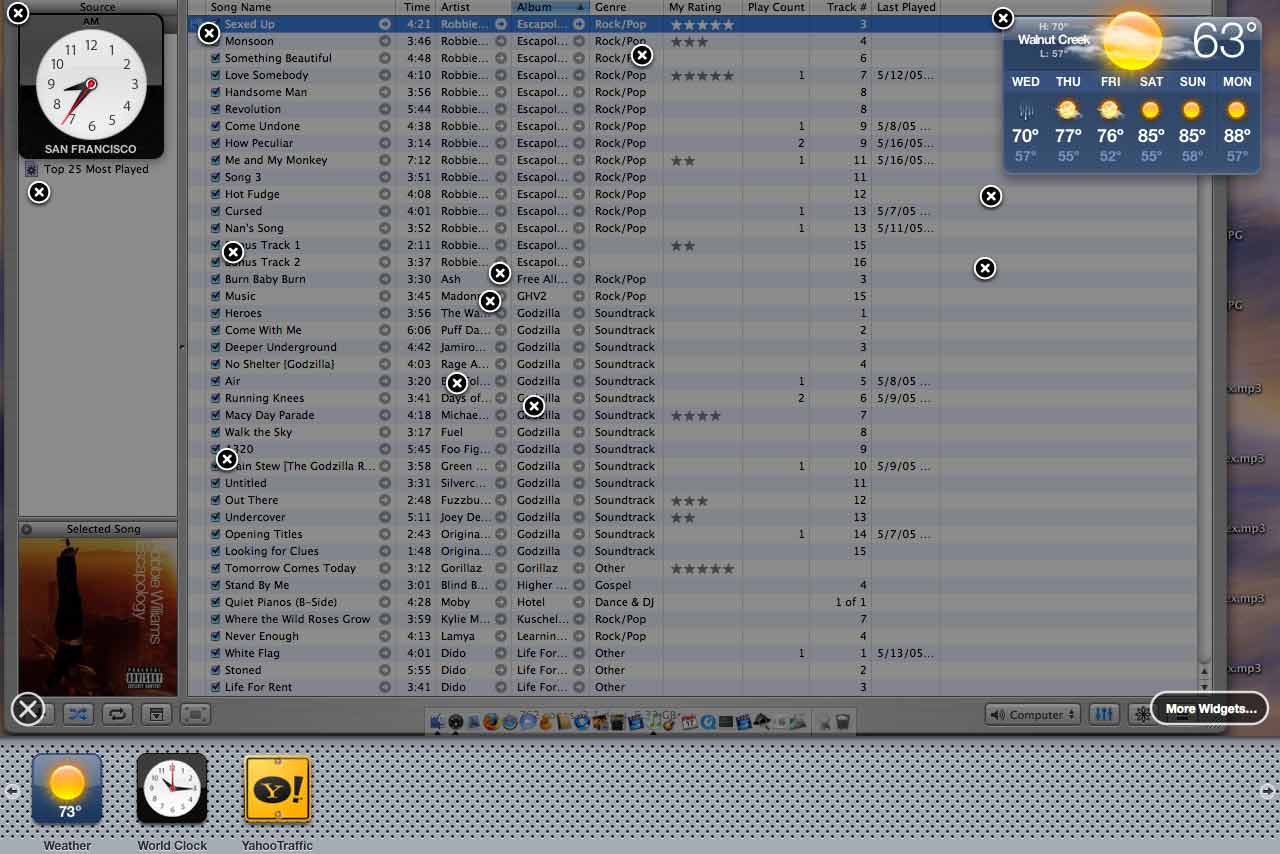
Dashboard trouble under Tiger 10.4.1
I am having a weird thing happenning to my dashboard under 10.4.1
Check out the image:

Check out the image:
Subscribe to:
Posts (Atom)

 Posts
Posts

